Introduction
The debate around Meta pixel standard events vs custom conversions isn't really about code complexity or dashboard preferences. It's about how Meta's machine learning receives and processes your conversion signals. Standard events are hardcoded actions that Meta's algorithm natively recognizes, such as Purchase, Lead, and AddToCart. Custom conversions are rule-based filters layered on top, usually tied to a specific URL or parameter. The structural difference matters because Meta's AI optimizes toward the signal you give it, and if that signal is filtered or ambiguous, your campaign performance suffers.
In this post, I'm walking through exactly how these two tracking methods work, why treating them as interchangeable is a mistake I see constantly, and how to build a hybrid setup that gives Meta's bidding system the clean signal it needs while keeping your reporting organized. I'll also cover how the Conversions API fits in, because in 2026, running either tracking method without a solid server-side layer is leaving real data on the table.
What Meta Pixel Standard events vs custom conversions actually are
Most people stumble into this topic because something in their Ads Manager doesn't add up. The numbers look off. Conversions are being reported, but ROAS feels wrong. I've been there, and nine times out of ten the root cause is a misunderstanding of Meta pixel standard events vs custom conversions at the structural level.
Standard events are predefined actions with fixed names that Meta has built into its algorithm. When you fire a Purchase event, Meta's system doesn't just log a conversion. It feeds that signal into a global model that understands the value of a purchase across billions of campaigns. The algorithm knows what a purchase means. It knows how to find more people likely to purchase.
Custom conversions work differently. They're filters. You create a rule like "fire a conversion when someone lands on /thank-you" and Meta tags that URL visit as a conversion event. No extra code on the page required. It sounds convenient, and it is. Custom conversions actually inherit the signal from whatever standard event fired on that page, so if a Purchase event triggered on /thank-you, Meta knows it's a purchase. The real downside isn't signal quality. It's maintenance overhead. URLs change during site migrations, and when they do, your custom conversion silently breaks. For primary optimization goals, standard events fired directly are more reliable long-term.
Here's my blunt take: custom conversions are a reporting tool dressed up as a tracking tool. They have a real place in a smart setup, but they should not be your primary optimization signal.
The Facebook Standard Events List you actually need to know
Not every event on the Facebook Standard Events List is equally useful for optimization. There are nine that I actually care about in most campaign builds, and the rest are situational.
The core Facebook Standard Events List includes: PageView, ViewContent, Search, AddToCart, AddToWishlist, InitiateCheckout, AddPaymentInfo, Purchase, and Lead. Those are your workhorses. Meta's algorithm has years of training data on what each of these actions means in the context of a buying journey.
For info-product and coaching businesses specifically, the ones I reach for most are Lead, Purchase, and ViewContent. If you're running a webinar funnel, CompleteRegistration is on the Facebook Standard Events List and it maps perfectly to a registration confirmation page. Don't improvise a custom conversion there when the standard event already exists.
I'll be honest: I spent a solid two years early in my agency days firing custom conversions everywhere because I thought it gave me more granular control. It did, in the reporting sense. But I was accidentally starving Meta's algorithm of the structured signals it needed to optimize. My CPLs were higher than they should have been, and I didn't fully connect the dots until I rebuilt one client's funnel from scratch using only standard events for bidding and custom conversions for reporting segments.
The Facebook Standard Events List also enables features that custom conversions don't. Dynamic product ads, value-based optimization, and advanced matching all depend on standard events. If you skip them, you're opting out of capabilities that Meta has spent years building.
When to use custom conversions Facebook and when not to
So when to use custom conversions Facebook is the real question, and the answer is more nuanced than most guides admit.
Use custom conversions when you need to segment a standard event further without adding new Pixel code. Classic example: you sell three different courses and they all fire the same Purchase event. You want to report on each product separately in Ads Manager. Create a custom conversion per thank-you URL. You get the segmentation without touching your event code.
Use custom conversions when you're tracking an action that doesn't fit neatly into the Facebook Standard Events List and you need it for reporting, not optimization. A content download, a calculator result page, a specific video play threshold. These are fine as custom conversions because you're not optimizing your campaign bid toward them.
Don't use custom conversions when using custom conversions Facebook would mean replacing a standard event as your primary optimization signal. If your campaign is set to optimize for conversions and you're pointing it at a URL-based custom conversion rather than a Purchase or Lead event, you're giving Meta a weaker signal. The campaign will spend longer in the learning phase and likely exit it with less efficiency.
Don't use them as a workaround for broken event implementation. I see this constantly. Someone can't get the Lead event to fire correctly, so they build a custom conversion off the thank-you page URL instead. Short-term fix, long-term drag on performance.
The cleaner framing: standard events are for optimization, custom conversions are for reporting segmentation.
How to track custom web events Meta Ads without breaking your optimization
When you need to track custom web events Meta Ads doesn't have a predefined standard for, you have two options: custom events and custom conversions. They're not the same thing, and conflating them is a common error.
A custom event is code-based. You define an event name like DownloadedGuide and fire it through the Pixel. To track custom web events Meta Ads style, you'd write: fbq('trackCustom', 'DownloadedGuide', {value: 0.00, currency: 'USD'}). You can then use that event in Ads Manager.
You can use custom events for campaign optimization directly. Meta allows them as conversion goals. The catch is that custom events don't carry the same pre-trained algorithmic understanding that standard events do. Meta's model has years of data on what a 'Purchase' means, but it has no context for your 'DownloadedGuide' event. So while you can optimize toward custom events, the learning phase may take longer and the efficiency may be lower than an equivalent standard event.
The practical takeaway is this: if an action on your site matters enough to optimize toward, find the closest match on the Facebook Standard Events list and use that. If the action is purely informational for your reporting, use a custom event or a URL-based custom conversion. To track custom web events Meta Ads accurately, keep them in the reporting layer, not the optimization layer.
Optimized bidding conversions API: where the real signal lives
This is where the conversation gets serious. The Meta Pixel running client-side is losing signal every year. iOS privacy changes, browser restrictions, and ad blockers mean a meaningful percentage of your conversions never reach Meta. The optimized bidding conversions API solution is the fix, and in 2026 it's not optional for serious advertisers.
The Conversions API sends event data directly from your server to Meta, bypassing the browser entirely. When you pair Pixel firing with server-side CAPI events, you're running what Meta calls redundant signals with deduplication. The result is a higher event match quality score and better optimized bidding conversions api performance because Meta's algorithm is working with more complete data.
Here's what I care about most: event match quality. When you track custom web events Meta Ads through CAPI with strong customer information parameters like hashed email, phone, name, and IP address, your EMQ score improves. Better EMQ means Meta can match more of your conversion events to real Facebook users, which means better targeting and lower costs over time.
The optimized bidding conversions api setup also changes how you should think about Meta pixel standard events vs custom conversions. With CAPI, you want to send standard events server-side, not custom conversions. CAPI supports the full Facebook Standard Events List, and sending a Purchase event through CAPI with value and currency parameters gives Meta the richest possible signal. Custom conversions can still be layered on top for reporting, but the backbone should be standard events flowing through both Pixel and CAPI.
Don't sleep on this. When I rebuilt tracking for higher-spend accounts, moving to a proper Pixel-plus-CAPI stack consistently improved CPA efficiency within the first month. Not because the ads changed, but because Meta's algorithm finally had complete data to work with.
How Roaspy fits into this
This is exactly the type of problem Roaspy was built to solve. Getting Meta pixel standard events vs custom conversions right is one thing. Seeing accurate attribution data that reflects what's actually happening across your full funnel is another challenge entirely.
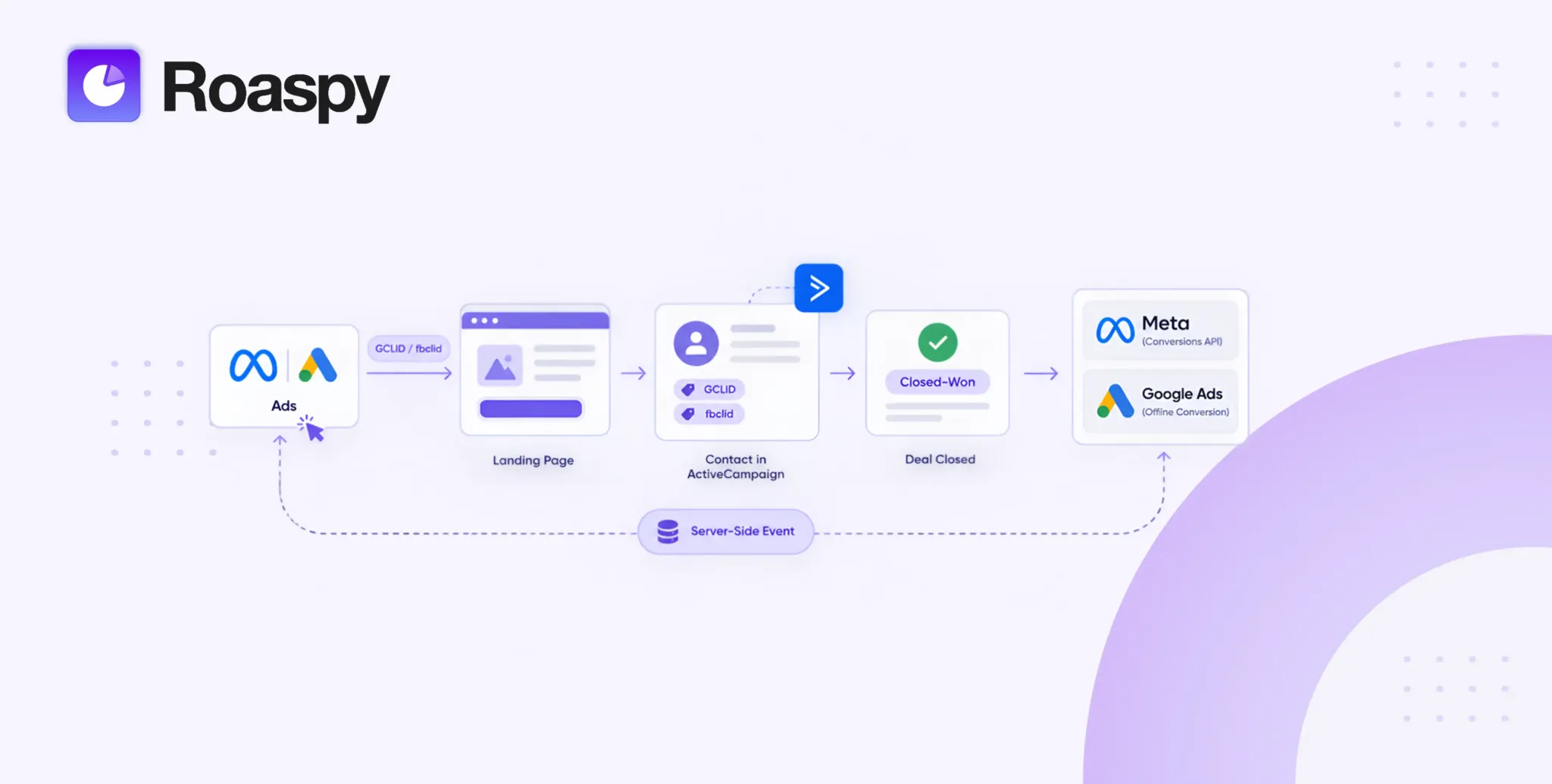
Roaspy is a full-funnel ad tracking and attribution platform built specifically for digital marketers, info-product businesses, agencies, and coaches. What makes it different from legacy tools is the combination of FingerprintJS technology for highly accurate visitor identification, a CAPI integration that sends clean conversion data directly to Meta and Google Ads, and a Chrome extension that lets you see real-time attribution data right inside your Ads Manager without switching tabs.
I started relying on Roaspy after getting burned by bloated legacy tools that gated the features I actually needed behind expensive tiers. Tools like HYROS start at $230 per month just to track up to $20,000 in monthly revenue. ClickMagick's Standard plan runs $199 per month for 100K tracked visitors. AnyTrack starts at $100 per month. Roaspy starts free up to $1,500 in ad spend, and the paid plans start at $47 per month with every feature unlocked on every plan. No gated dashboards. No enterprise walls.
The thing that sealed it for me was seeing the CAPI integration in action. It feeds the optimized bidding conversions api pipeline correctly, which means the signal Meta receives is clean and matched properly. That directly affects how campaigns exit the learning phase and how bidding performs long-term.
If you're tired of piecing together tracking with duct tape and hoping your custom conversions are firing correctly, try Roaspy for free at https://roaspy.com.
Frequently asked questions
Q: Can I optimize a Facebook Ads campaign for a custom conversion?
A: Yes, technically you can. But Meta's algorithm treats custom conversions as a weaker signal compared to standard events, which means longer learning phases and often higher CPAs. Use standard events for optimization and reserve custom conversions for reporting segmentation.
Q: What is the difference between a custom event and a custom conversion?
A: A custom event is code you fire through the Pixel for an action that doesn't exist on the standard events list. A custom conversion is a rule-based filter in Ads Manager, usually tied to a URL. You can use both for reporting, but neither should replace standard events for bidding.
Q: When to use custom conversions Facebook for an info-product funnel?
A: Use them to segment purchases by product or funnel without adding new Pixel code. If you sell multiple offers that all fire the same Purchase event, custom conversions let you filter by thank-you URL in reporting while keeping your bidding signal clean and standard.
Q: Does the Conversions API replace the Meta Pixel?
A: No. They're designed to work together. The Pixel captures browser-side data, CAPI captures server-side data, and deduplication using a shared event ID prevents double-counting. Running both gives Meta the most complete signal possible for the optimized bidding conversions api system.
Q: How many custom conversions can I have in Meta Ads Manager?
A: Meta allows up to 100 custom conversions per ad account. In practice, if you're hitting that ceiling, you likely need to rethink your event architecture and consolidate tracking using standard events with parameters rather than multiplying URL-based rules.
Q: Do I need the Conversions API if my Pixel is already set up correctly?
A: Yes. Browser-based Pixel tracking is losing coverage every year due to iOS changes and browser restrictions. CAPI ensures your conversion data reaches Meta even when the Pixel can't fire. For strong optimized bidding conversions api performance, running both is the current standard.
My final thoughts
The Meta pixel standard events vs custom conversions question isn't going away. If anything, it gets more important as Meta's algorithm becomes more dependent on clean, structured signals to make bidding decisions. The advertisers who understand this distinction are the ones consistently seeing better CPAs, shorter learning phases, and more predictable scale.
My honest recommendation: audit your current event setup this week. Check whether your optimization events are standard events from the Facebook Standard Events List or URL-based custom conversions. If it's the latter for your main conversion goal, rebuild it. It's not as painful as it sounds, and the performance improvement is worth the afternoon you'll spend on it.
Pair that rebuild with a proper CAPI integration and you've got a tracking stack that feeds Meta the signal it needs to work for you, not against you. The optimized bidding conversions api layer is where the real performance leverage lives in 2026.
If you want attribution data that actually reflects what's happening across your funnel, and you want to stop guessing whether your events are firing cleanly, go try Roaspy at https://roaspy.com. The free plan gets you started immediately. The paid plans are priced for real businesses, not enterprise budgets. And unlike most tools in this space, every feature is available from day one.