Introduction
If you’re looking for a free ClickMagick alternative that doesn’t water down your data or lock you into a confusing setup, Roaspy is where I’d point you first. It has a genuinely free tier supporting up to $1,500 in monthly ad spend, and it gives you CAPI integration, full-funnel attribution, and a Chrome extension that sits right inside your Ads Manager on day one. No trial games, no gated features, no credit card handcuffs.
Here’s the thing most “beginner tracking guides” skip: ad attribution for beginners isn’t just a nice-to-have. It’s the difference between knowing what’s working and burning money on instinct. In this post, I’ll walk you through why tools like ClickMagick feel overwhelming early on, what the common no-cost ad tracking workarounds actually get wrong, and why a simple ad tracker built on modern technology can set you up better from the start than anything I had access to when I was first learning this stuff.
Why beginners feel trapped by tracking tools
Most new media buyers know they need tracking. They’ve heard the horror stories of scaling a campaign that looked profitable in Ads Manager but was bleeding cash in reality. So they go looking for a solution and immediately hit a wall.
The options either feel too expensive or too technical. Or both.
Beginner ad tracking shouldn’t require a PhD in JavaScript. But a lot of legacy tools were built in an era where that kind of setup was just accepted as the cost of doing business. I get it. When I was first figuring this out, I spent days reading documentation that felt like it was written for engineers, not marketers.
The result? Most beginners either skip tracking entirely or lean entirely on raw platform data. Both are bad ideas. Platform data has attribution bias baked in. And skipping tracking means you’re flying blind.
This is the core problem that good ad tracking software, free of an overcomplicated setup, is supposed to solve. The question is: which tool actually does that?
Why use ClickMagick, and why it might not be the right first tool
To be fair, why use ClickMagick is a reasonable question. It’s been around for years. It tracks clicks, builds funnels, and has split testing. For affiliates, especially, it has a loyal following. At around $79–$199/month, depending on your plan, it’s not outrageously priced for what it does.
But here’s my honest take: ClickMagick was built for a different era of tracking. The setup process can take three to five days if you’re doing it properly, configuring rotators, adding tracking pixels, and setting up postback URLs. For someone running their first $500 test campaign, that overhead is brutal.
I’ve talked to agency clients who spent more time setting up ClickMagick than they did writing their ad copy. That’s backwards. The best ad tracker for small budgets shouldn’t eat your week before you’ve even launched.
Why use ClickMagick makes more sense once you’ve got systems in place and a team to implement them. For a beginner testing their first offer? It’s often overkill wrapped in complexity.
The pitfalls of “free” alternatives that aren’t really free
When people search for ad tracking software free, they often land on one of a few options: raw platform analytics, UTM parameters dumped into a spreadsheet, or the free tiers of older tools with heavy restrictions.
Here’s what each of those actually gives you.
Raw Meta or Google data is single-touch. It takes credit for the last click and ignores everything before it. After iOS 14.5, this got even messier. Modeled conversions are better than nothing, but they’re estimates, not facts.
UTM tracking is fine for top-level channel data, but it falls apart the moment someone switches devices, clears cookies, or comes back three days later. No-cost ad tracking built on UTMs alone is like navigating with a map that’s missing half the roads.
Older tools with “free” tiers usually give you 1,000 tracked clicks and then hit you with a paywall. That’s not a free tier. That’s a demo. Simple ad tracker options in this category are really just lead magnets for an upgrade.
The honest truth: most ad tracking software free options have a hidden cost, either in accuracy, in setup time, or in the moment they expire and leave you scrambling.
What beginner ad tracking actually needs to look like
Beginner ad tracking has a few non-negotiable requirements that don’t get talked about enough.
First: it needs to work on day one. Not after a three-day integration sprint. Same-day setup is the baseline expectation, and any simple ad tracker that can’t meet that isn’t really built for beginners.
Second: it needs to handle the post-iOS 14 reality. That means server-side tracking, not just browser pixels that get blocked by Safari or stripped by Apple’s privacy changes. Ad attribution for beginners in 2024 means CAPI is table stakes, not a premium add-on.
Third: it should not require you to leave your workflow. The best ad tracker for small budgets is one you’ll actually use consistently. If checking your attribution means logging into a separate dashboard, tabbing back to Ads Manager, and reconciling the numbers manually, most beginners won’t do it long enough to get value from it.
I covered the importance of accurate tracking in one of my recent YouTube videos. The short version: scaling gets dramatically easier when your data tells you the truth. You stop guessing. You kill losers faster. You scale winners with confidence.
No-cost ad tracking that actually works gives you that clarity without the financial barrier.
The success tax nobody warns you about
Here’s something most beginners don’t realize until it stings them.
A lot of tracking tools charge based on volume. More clicks, more events, more spend means a higher bill. Sounds fair in theory. In practice, it means the better your campaigns perform, the more you pay for your tracking software. I call this the success tax.
HYROS, for example, starts at $230/month and scales up based on revenue tracked. Some plans push toward $500–$800/month for mid-sized accounts. Why use ClickMagick at $79/month looks reasonable by comparison, until your volume grows and you’re on the $199 plan, then potentially looking at custom pricing.
The best ad tracker for small budgets should stay affordable as you grow, not penalize you for it. That’s a design choice, not an accident. Legacy tools built this model intentionally because their costs scale with their infrastructure, and they pass that to you.
Ad attribution for beginners shouldn’t come with a clause that says “Congratulations on scaling, here’s a bigger bill.” Flat pricing is a feature.
Why I recommend Roaspy as your free ClickMagick alternative
This is the part where I tell you what I actually use and why.
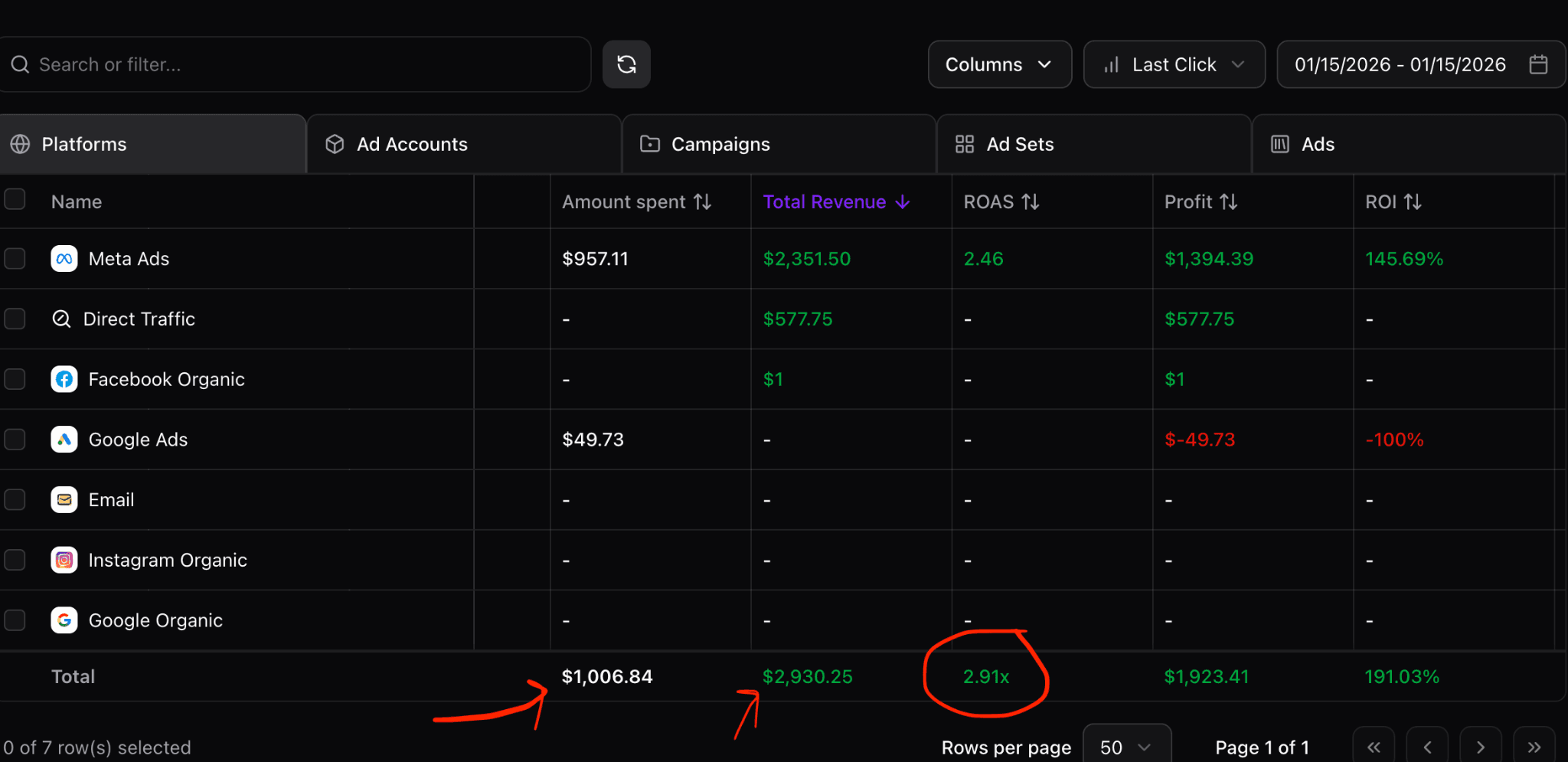
Roaspy is the tool I point people to when they ask for a free ClickMagick alternative that doesn’t compromise on accuracy. The Roaspy free tier covers up to $1,500 in monthly ad spend, and every feature is unlocked. No gating. No “upgrade to access CAPI.” You get the full stack from day one.
What makes it genuinely different from older options:
Feature | Roaspy | ClickMagick | HYROS |
Pricing | Free (up to $1,500/ ad spend) / $47/mo | $79/month | $230+/month |
CAPI integration | Included on all plans | Limited | Yes |
Chrome extension | Yes, built-in | No | No |
Setup time | Same-day | 3-5 days typical | Days to weeks |
FingerprintJS tracking | Yes | No | No |
Pricing model | Flat $47/month (paid tier) | Volume-tiered | Revenue-based |
Gated features | None | Some | Yes |
The Chrome extension is something I think is underrated for ad attribution for beginners. Instead of bouncing between your tracking dashboard and Ads Manager, you see real attribution data right inside Meta’s interface. That alone changes how fast you can make decisions.
The FingerprintJS technology Roaspy uses means better cross-device identification, which directly addresses the post-iOS accuracy gap that broke a lot of legacy tracking setups. This is what makes the Roaspy free tier punching significantly above its weight class compared to ad tracking software free options built on older cookie-based methods.
When you grow past $1,500/month in spend, the paid tier is a flat $47/month. That’s it. No success tax. No usage-based scaling. Your tracking costs stay predictable while your campaigns scale.
I started steering people toward Roaspy after seeing clients pay $300–$600/month for tools that still gave them attribution gaps. The Roaspy free tier alone solves what most beginners actually need: accurate data, fast setup, and no-cost ad tracking that works from day one.
Try it at https://roaspy.com.
Frequently asked questions
Q: Is Roaspy actually free, or is it just a trial?
A: The Roaspy free tier is a real free plan, not a time-limited trial. It covers up to $1,500 in monthly ad spend with all features unlocked. You don’t need a credit card to start, and there’s no expiry date attached to it.
Q: Why use ClickMagick at all if free alternatives exist?
A: ClickMagick has its strengths, especially for affiliate marketers who need click rotators and postback URLs. But for most beginners running paid social or search campaigns, why use ClickMagick when a simpler, faster, and free option covers the same tracking needs with less setup friction?
Q: What makes Roaspy better for beginner ad tracking than just using Meta’s native data?
A: Meta’s native data is single-touch and increasingly affected by iOS privacy changes. Roaspy uses server-side CAPI integration and FingerprintJS to track the full customer journey across devices and sessions, giving you attribution data that’s far more accurate than what Ads Manager shows by default.
Q: Does the Roaspy free tier include CAPI for Meta and Google Ads?
A: Yes. CAPI integration is included on all plans, including the free tier. This is one of the key things that separates the Roaspy free tier from older ad tracking software free options that gate server-side tracking behind higher-tier plans.
Q: How long does it actually take to set up Roaspy?
A: Most users are fully set up the same day. The Chrome extension installs in minutes, and the CAPI integration has a straightforward guided process. Compare that to the three-to-five day setups typical of legacy tools and it’s a meaningful difference for someone who just wants to start running data-informed campaigns.
Q: Can Roaspy replace HYROS or ClickMagick for an established account, or is it just for beginners?
A: Roaspy is built for full-funnel tracking at any scale. The simple ad tracker reputation undersells it a bit. Agencies and established media buyers use it because the accuracy holds up at volume, and the pricing keeps margins intact as spend grows.
My final thoughts
If you’re a beginner trying to get tracking right without spending money you haven’t made back yet, the honest answer is: you don’t need to pay for it. A legitimate free ClickMagick alternative exists, it works, and it doesn’t ask you to sacrifice accuracy to use it.
What I wish someone had told me earlier is that beginner ad tracking doesn’t have to be painful. The complexity and cost I accepted as normal early on wasn’t normal. It was just the incumbent tools defending their pricing model. Modern ad tracking software free of that overhead is genuinely possible now because the technology has caught up.
The no-cost ad tracking conversation used to be about compromise. Pick something cheap, accept the gaps, upgrade when you’re making money. That’s not the trade-off anymore. The Roaspy free tier gives you enterprise-grade attribution, CAPI out of the box, and a Chrome extension that keeps everything inside your existing workflow. The best ad tracker for small budgets shouldn’t feel like settling, and this one doesn’t.
Start with the free tier. Test your campaigns with clean data. When your spend grows past $1,500/month, the flat $47/month paid plan means your tracking bill doesn’t become another variable eating into your margins. That’s the kind of structure that makes scaling sustainable.
Go try it at https://roaspy.com and stop making media buying decisions on guesswork.