Introduction
The Hyros ClickFunnels 2.0 integration is not a one-click thing. It never has been. You’re stitching together two platforms that don’t natively speak to each other, which means manual script placement, custom tracking parameters, and a decent amount of babysitting to keep the data clean. If you’ve been hunting for a clean, working setup guide, I’ll walk you through exactly how to connect Hyros to ClickFunnels 2.0, step by step. And then I’ll show you a simpler path if you’re open to it.
In this post, I’ll cover what Hyros is actually doing under the hood, the full manual setup process, where it commonly breaks, and how to track ClickFunnels conversions 2026 with tools that are built specifically for the platform. I’ll also introduce you to what I personally use and why I consider it the best ClickFunnels ad tracking alternative for media buyers who run Meta campaigns and need numbers they can actually trust.
What Hyros actually does and why people try to connect it to ClickFunnels 2.0
Hyros is a third-party ad attribution platform that bills itself as AI-powered call and lead tracking. At its core, it works by placing a JavaScript tracking pixel on your funnel pages, capturing lead email data at opt-in, and then matching that email to ad click data in your campaigns. The result is supposed to be a cleaner view of which ads drove revenue, especially across long sales cycles.
People try to set up the Hyros ClickFunnels 2.0 integration because they’re frustrated with Meta’s native attribution. iOS 14 wrecked pixel-based tracking, and if you’re running high-ticket offers with multi-step funnels, the gap between what Meta reports and what actually happened can be maddening.
Honestly, I get it. I’ve been in that frustration. You look at your ads manager, see a ROAS of 3.2, then check your Stripe and think: where did that come from?
Hyros promises to fill that gap by building a persistent customer profile tied to an email address. It traces that person backward to the ad that brought them in. In theory, it’s solid. The problem starts when you try to actually connect Hyros to ClickFunnels 2.0, because ClickFunnels 2.0 is a fundamentally different architecture from CF classic, and the integration isn’t plug-and-play.
Pricing-wise, Hyros starts around $230 per month and scales upward based on tracked revenue. For info-product sellers doing solid volume, that’s a real line item.
How to connect Hyros to ClickFunnels 2.0: the full manual setup
Let me walk through what the actual setup looks like. This is based on what I’ve seen and done, not a sanitized vendor walkthrough.
Step 1: Get your Hyros tracking script
Log in to your Hyros account and navigate to Settings > Tracking. Copy your unique JavaScript snippet. It looks like a standard pixel tag with your account ID embedded.
Step 2: Add the script to ClickFunnels 2.0 globally
In ClickFunnels 2.0, go to your Site Settings (not funnel settings). Under Tracking Codes, paste the Hyros script in the Head Tracking Code section. This fires it globally across all your pages. If you only want it on specific funnels, you’ll need to add it page by page inside each funnel’s settings under Custom Code.
Step 3: Set up email capture tracking
This is where it gets manual. To connect Hyros to ClickFunnels 2.0 properly, you need to ensure Hyros captures the email at the opt-in step. Hyros uses a method called “email autocapture,” which reads form fields on the page. In CF 2.0, you need to verify that your form fields have the correct name attributes. Hyros expects standard name tags like email. CF 2.0 sometimes generates its own field IDs. You may need to inspect the element and confirm, or use a custom JavaScript trigger to push the email to Hyros manually.
Step 4: Track Revenue Using ClickFunnels Webhooks
To track ClickFunnels 2.0 revenue in Hyros, you don’t paste a purchase script on the order confirmation page. Instead, Hyros tracks revenue via webhooks sent from ClickFunnels when a purchase occurs.
Once the webhook is configured in ClickFunnels, purchase data such as the order value and customer details is automatically sent to Hyros. This allows Hyros to attribute the revenue to the correct ad click and customer journey without relying on client-side scripts.
Step 5: Connect your ad accounts
Inside Hyros, connect your Meta Ads account via API. This lets Hyros pull in your spend data and match it against the lead and sale data it’s collected. Go to Hyros > Ad Platforms > Add Account and follow the OAuth flow.
Step 6: Set up UTM parameters
Every ad URL needs UTMs. Hyros relies heavily on first-click UTM data combined with email matching. Without consistent UTM tagging across all your campaigns, the attribution breaks. Use a naming convention and stick to it.
That’s the core setup. It works, but it’s fragile.
Where the Hyros ClickFunnels 2.0 integration breaks down
I want to be direct here. The Hyros ClickFunnels 2.0 integration has real failure points that most setup guides don’t warn you about.
First, email autocapture is unreliable in CF 2.0. The platform generates dynamic form IDs, and if Hyros can’t find the email field, the entire attribution chain breaks. You’ll see leads in ClickFunnels 2.0 that never appear in Hyros, which means those conversions go unattributed.
Second, ClickFunnels 2.0 doesn’t load external scripts the same way CF classic does. Scripts can be deferred or blocked by the platform’s own performance optimization. I’ve seen cases where the Hyros pixel fires inconsistently depending on page load speed and browser settings.
Third, ad blockers kill client-side pixels. If your audience is tech-savvy, a meaningful percentage of them are running ad blockers, and Hyros’s JavaScript snippet will never fire for those users. This is an industry-wide problem, but it hits harder when your entire attribution stack depends on client-side execution.
Fourth, when you try to connect Hyros to ClickFunnels 2.0 across multiple funnels with order bumps, upsells, and downsells, the revenue tracking gets messy. Each step is a different page, sometimes with different payment triggers, and mapping all of it manually takes real time.
I’ve watched people spend entire weekends debugging this setup only to end up with data they still don’t fully trust. That’s not a knock on Hyros as a concept. It’s a reality of trying to use a legacy tracking tool with a modern funnel builder that wasn’t designed around it.
How to track ClickFunnels 2.0 conversions 2026 without duct-taping two platforms together
The way I think about how to track ClickFunnels 2.0 conversions 2026 has shifted a lot over the last couple of years. The iOS 14 fallout forced everyone to rethink their attribution stack, and the tools that won were the ones built around server-side event delivery.
Here’s the honest breakdown of what you need in 2026:
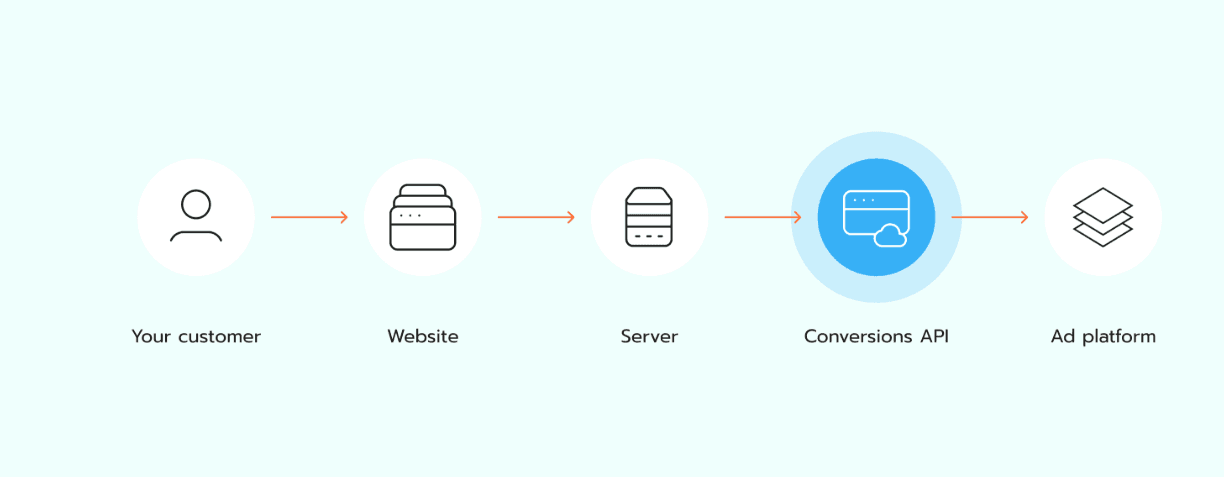
Server-side conversion tracking. Client-side pixels are dying. Server-side means your conversion data travels directly from your funnel’s backend to the ad platform’s API, bypassing the browser entirely. Ad blockers can’t touch it. iOS privacy settings can’t touch it. The data just gets there.
Native funnel platform integration. The tools that require you to manually inject scripts and babysit form field names are a maintenance burden. What you actually want is a tool that understands CF 2.0’s structure natively, so you’re not reverse-engineering things every time ClickFunnels 2.0 pushes an update.
Data that shows up where you make decisions. I’ll say this plainly: most media buyers make scaling decisions inside Meta Ads Manager. If your attribution tool lives in a separate dashboard that you have to remember to check, you’re adding friction. The best ClickFunnels 2.0 ad tracking alternative is one that surfaces insights in the place you already are.
Real-time reporting. A 24-48 hour attribution delay is not acceptable when you’re making daily bid decisions. You need to know what’s working today, not what worked Tuesday.
This is exactly the thinking behind how I started building and using Roaspy for ClickFunnels 2.0.
Why Roaspy is the ClickFunnels 2.0 ad tracking alternative I actually recommend
Roaspy was designed to solve a common problem for ClickFunnels 2.0 media buyers: reliable attribution without complex setup. I had clients running ClickFunnels 2.0 funnels with Meta ad budgets in the five figures per month, and the attribution gap was costing them real money. Bad data leads to bad scaling decisions. That’s just the truth.
Roaspy for ClickFunnels 2.0 works differently from legacy tools like Hyros. Instead of relying on JavaScript autocapture or email matching from the client side, Roaspy uses a 1:1 server-side CAPI connection. Every lead and purchase event is transmitted server-to-server, directly to Meta’s Conversions API. Nothing gets lost to ad blockers or browser privacy settings.
The integration with ClickFunnels 2.0 is a single click. You connect your CF 2.0 account inside Roaspy, authorize it, and the platform automatically maps your funnel steps. There’s no custom code to paste, no form field names to inspect, no manual purchase event scripts. It just works.
What really changed how I work is the native Meta Ads Manager overlay. Roaspy surfaces your ROAS, cost per lead, and conversion data directly inside your Meta Ads Manager interface. You don’t leave the platform where you make decisions. That’s a feature I’ve never seen another ClickFunnels2.0 ad tracking alternative execute well.
One frustration I had before Roaspy: I was checking three different dashboards before I could decide whether to scale an ad set. That’s gone now.
Roaspy keeps pricing simple. It includes a free plan for up to $1,500 in ad spend per month, and after that pricing starts at $47/month. There’s no percentage of revenue and no complicated tiers that increase as your campaigns scale.
Hyros, on the other hand, starts around $230/month and increases based on the revenue it tracks.
Try it for yourself at https://Roaspy.com.
Roaspy vs Hyros: a real comparison for ClickFunnels 2.0 users
I want to give you a real side-by-side because this is genuinely a comparison most people are trying to make. I’ve used both, built funnels around both, and the differences are not small.
Feature | Roaspy Ads Tracking | Hyros |
Pricing Model | Flat Fee | Revenue-Based Scaling |
Starting Price | Free (up to $1,500 spend) → $47/mo | $230/mo (Up to $20k revenue) |
Success Tax | None (Flat $47/mo) | Yes (Scales to $1,499+/mo) |
ClickFunnels 2.0 Integration | 1-Click Native | Manual script + API mapping |
Tracking Method | 1:1 Server-side CAPI | Hybrid (JS + S2S for Enterprise) |
Ad Blocker Vulnerability | None (Server-side priority) | High (on lower-tier JS-only plans) |
Meta Ads Manager Overlay | Yes, native Chrome extension | No (Requires separate dashboard) |
Funnel Journey Mapping | Automated | Manual UTM setup required |
Real-time ROAS | Yes (Real-time extension) | Delayed (Batch processing) |
Setup Time | Minutes | Hours to Days |
Best For | ClickFunnels 2.0 + Meta | Multi-platform, $100k+ enterprise |
The case for Hyros is real if you’re running a complex sales operation with phone calls, long follow-up sequences, and multiple traffic sources. It handles multi-touch attribution across channels in a way Roaspy isn’t trying to replicate.
But if you’re a media buyer running Meta traffic into ClickFunnels 2.0 funnels and you need to track ClickFunnels 2.0 conversions 2026 accurately, using Roaspy for ClickFunnels 2.0 is the faster, cleaner, more reliable path. The setup alone saves you a full day of work.
Using Roaspy for ClickFunnels 2.0 in your Meta campaigns isn’t just about convenience. It’s about trusting your numbers, which is what good media buying actually runs on.
Frequently asked questions
Q: Is the Hyros ClickFunnels 2.0 integration officially supported by Hyros?
A: Hyros supports ClickFunnels 2.0 as a platform, but the integration is not native to CF 2.0’s architecture. You’re still relying on manual script placement and email autocapture, which behaves differently in CF 2.0 than it does on older funnel builders. Expect some troubleshooting regardless of what the documentation says.
Q: Can I connect Hyros to ClickFunnels 2.0 if I’m using order bumps and one-click upsells?
A: You can, but each step needs its own revenue tracking script installed correctly. One-click upsells in CF 2.0 have their own page structure, and the purchase event has to fire accurately on each confirmation step. Misconfigure one step and you’ll have revenue gaps in your attribution data.
Q: What’s the biggest risk when I try to connect Hyros to ClickFunnels 2.0?
A: Email autocapture failure. If Hyros can’t read the email from your opt-in form because of a form field ID mismatch, that lead never gets attributed to an ad. You can have hundreds of untracked conversions and not even know it until you compare your CRM numbers against your Hyros dashboard.
Q: Is there a simpler way to track ClickFunnels 2.0 conversions 2026 without manual script setup?
A: Yes. Tools built specifically for CF 2.0 with server-side tracking handle this natively. Roaspy for ClickFunnels 2.0 connects in one click and sends conversion data directly via server-side CAPI, so you’re not dependent on browser scripts at all. That’s the version of conversion tracking that actually holds up in 2026.
Q: How does the ClickFunnels 2.0 ad tracking alternative approach differ from what Hyros does?
A: The main difference is where the data travels. A strong ClickFunnels 2.0 ad tracking alternative in 2026 sends conversion events server-to-server, bypassing the browser entirely. Hyros leans heavily on client-side JavaScript and email matching. The server-side approach is more reliable, especially for audiences with higher rates of ad blocker usage or iOS devices.
Q: Does Roaspy work with traffic sources other than Meta?
A: Roaspy’s current focus is Meta Ads with the native Ads Manager overlay, which is where most ClickFunnels 2.0 media buyers spend their budgets. If you’re running significant Google or TikTok traffic, it’s worth checking the current integrations at Roaspy.com to see what’s supported for your stack.
My final thoughts
Here’s where I land after years of working with ad tracking setups across dozens of ClickFunnels 2.0 accounts: the complexity of the Hyros ClickFunnels 2.0 integration is not a bug, it’s a reflection of the fact that Hyros was built before CF 2.0 existed. It’s a capable tool trying to work in an environment it wasn’t designed for, and the manual setup burden is the tax you pay for that mismatch.
If you’re committed to Hyros for multi-channel attribution across phone sales and complex CRM workflows, the setup in this post will get you there. Just go in knowing it needs maintenance, and check your email capture regularly because that’s where things quietly break.
But if your world is Meta traffic into ClickFunnels 2.0 funnels, and you want to track ClickFunnels 2.0 conversions 2026 in a way that doesn’t require a PhD in debugging, I genuinely think there’s a better option. I built Roaspy because I was tired of the friction. One-click integration, server-side CAPI, real-time ROAS inside your Ads Manager. That’s what media buying should feel like.
Using Roaspy for ClickFunnels 2.0 changed how I run campaigns, specifically because it removed the doubt. When your attribution data is clean, your scaling decisions get sharper. You stop second-guessing whether the numbers are real and start acting on them.
If you’re ready to try the ClickFunnels 2.0 ad tracking alternative that’s actually built for CF 2.0, head over to https://Roaspy.com and see what your tracking setup could look like without the manual headaches. You might be surprised how much time you get back.