Introduction
Setting up a ClickMagick custom domain GoDaddy connection requires three things: access to your GoDaddy DNS panel, a CNAME record pointing to ClickMagick’s tracking server, and patience while DNS propagates. That’s the short answer. The full walkthrough below covers every click, every field, and every common mistake I’ve seen people make.
But here’s what I also want to be honest about. After years of managing campaigns with link-based tracking setups, I’ve come to question whether the effort-to-value ratio holds up in 2024 and beyond. This guide gives you the complete ClickMagick GoDaddy setup, and then I’ll show you what I actually use now and why it took me about an afternoon to switch.
What you actually need before you start
Before you touch a single DNS record, get these things in order. I’ve watched people jump straight into GoDaddy’s DNS panel, make changes, and then realize 24 hours later that they connected the wrong domain or skipped verification inside ClickMagick entirely.
Here’s what you need:
A GoDaddy account with a domain you own (ideally not your main brand domain)
An active ClickMagick account (Growth plan or above to access custom domains)
ClickMagick’s CNAME target URL, which you’ll grab from your account settings
That last point matters more than people realize. If you’re asking yourself which domain to use as the best custom domain for ad tracking, my honest recommendation is to buy a separate tracking domain. Don’t use your primary website domain. If your tracking domain ever gets flagged by Meta or Google, you don’t want your main brand caught in the crossfire.
I learned this one the hard way. Early in my agency days, I connected a client’s primary domain to their ClickMagick setup. It was convenient. It was also a bad call. When a campaign got flagged, the domain reputation took a hit across everything. A separate domain is a few dollars a year and a lot of insurance.
GoDaddy DNS CNAME for ClickMagick: the full setup walkthrough
This is the meat of it. Follow these steps exactly, and you’ll be live once propagation completes.
Step 1: Log in to GoDaddy and find DNS Management
Go to godaddy.com, log in, and navigate to “My Products.” Find the domain you want to use, click the three-dot menu next to it, and select “Manage DNS.” This opens the DNS Management panel where all the action happens.
Step 2: Add a new CNAME record
In the DNS Management panel, scroll down to the records table. Click “Add New Record” and select “CNAME” from the type dropdown.
Fill in the fields like this:
Name/Host: This is your subdomain. Use something clean like track or go (so your final link looks like track.yourdomain.com)
Value/Points To: Paste ClickMagick’s CNAME target here. You find this inside ClickMagick under Settings > Tracking Domains > Add Domain. It typically looks something like cname.clickmagick.com
TTL: Leave it at the default (1 hour) or drop it to 600 seconds if you want slightly faster propagation
Click Save.
That’s the GoDaddy DNS CNAME for ClickMagick record done. Straightforward, right?
Step 3: Verify the domain inside ClickMagick
Go back into ClickMagick. Under Settings > Tracking Domains, add your new subdomain (e.g., track.yourdomain.com). ClickMagick will attempt to verify it. If DNS hasn’t fully propagated yet, it’ll fail. Wait up to 48 hours, though in my experience it’s usually closer to 2 to 4 hours with GoDaddy.
Once verified, your setup tracking domain GoDaddy process is technically complete. You now have a custom-branded tracking subdomain that masks ClickMagick’s default URLs.
The hidden costs of ClickMagick tracking link setup
Here’s where I start to get opinionated.
The ClickMagick tracking link setup doesn’t end when DNS propagates. That’s actually when the real work begins. Now you have to wrap every single ad link. Every campaign. Every ad set. Every creative variation. You swap your destination URL for a ClickMagick link that redirects through your custom domain to the actual landing page.
This sounds fine until you’re running 40 active ad sets across three client accounts and you need to update a landing page URL. Now you’re hunting through ClickMagick to find and update every wrapped link. It’s administrative work that adds up fast.
ClickMagick’s Growth plan starts at around $79/month. Their Pro plan, which unlocks more features, runs closer to $349/month. For that price, you’d expect the workflow to feel a bit less… manual.
And this isn’t me dunking on ClickMagick. It was a solid tool for its era. But the ClickMagick GoDaddy setup was designed for a world where direct link tracking was the only option. The field has moved on.
I covered the dollar-per-lead optimization topic in a recent YouTube video (Increase Your Dollar Per Lead), and one thing that came up is how much invisible friction exists in a marketer’s workflow. Wrapped links are a form of invisible friction. You don’t feel it until you’re 6 months deep and drowning in link management.
The question isn’t whether the ClickMagick GoDaddy setup works. It does. The question is whether it’s the best custom domain for ad tracking approach available in 2026. I don’t think it is.
Domain flagging, redirect latency, and the conversion rate problem
Two things that don’t get talked about enough in the setup tracking domain, GoDaddy conversation: flagging risk and redirect speed.
Domain flagging
Ad platforms have gotten aggressive about link scanning. When you wrap your ad destination URL with a ClickMagick custom domain GoDaddy link, Meta and Google can see that redirect. They crawl it. If your tracking domain shows up on enough flagged campaigns across the platform, even your “clean” domain can inherit suspicion. I’ve seen these tank campaigns that were running clean for months.
A shared CNAME pointing to ClickMagick’s servers also means you’re on infrastructure that other advertisers use. If someone running shady offers shares that CNAME neighborhood with you, your risk exposure goes up.
Redirect latency
Every redirect adds milliseconds. On paper, that sounds trivial. In practice, across mobile users on slower connections, that extra hop through your tracking subdomain before reaching the landing page adds up. Studies consistently show that even 100ms of extra load time can reduce conversions. I’ve personally seen split tests where removing redirect-based tracking improved landing page conversion rates by a few percentage points. Not every time, not dramatically, but it’s a real effect.
This is exactly why the ClickMagick vs Roaspy setup conversation is worth having. One approach redirects traffic through a domain. The other identifies users at the session level without touching the URL at all.
ClickMagick vs Roaspy setup: a side-by-side look
Let me be direct about what the ClickMagick vs Roaspy setup comparison actually looks like in practice.
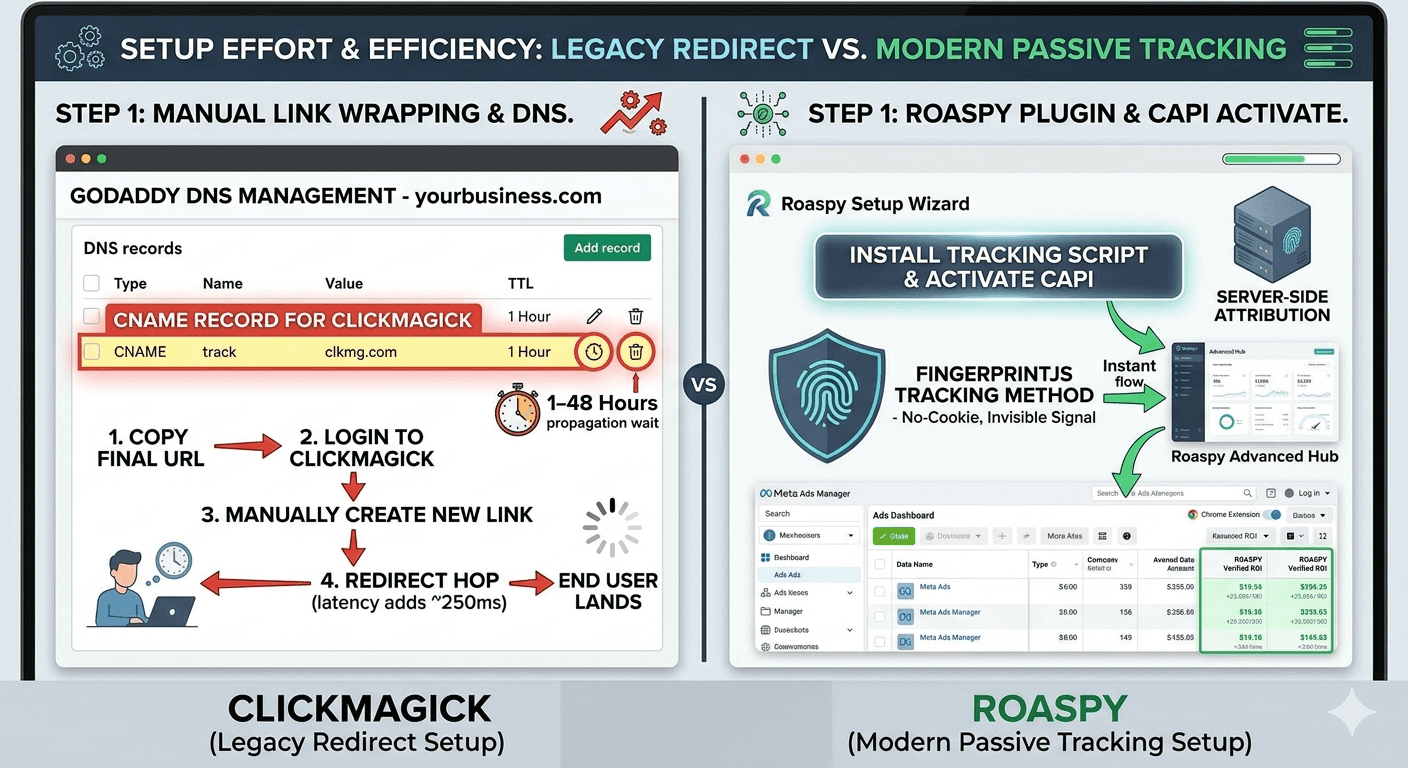
With the ClickMagick GoDaddy setup, your flow is: buy a domain, configure GoDaddy DNS CNAME for ClickMagick, wait for propagation, verify in ClickMagick, then manually wrap every ad link going forward. It works. It’s just slow and brittle.
With Roaspy, you install a lightweight script on your landing pages and thank you pages. That’s basically it. Roaspy uses FingerprintJS technology to identify and track users through your funnel without redirect links. No wrapped URLs. No CNAME configuration. No propagation wait.
Feature | Roaspy | ClickMagick |
Setup time | Same-day (script install) | 1-48 hours (DNS propagation) |
Link wrapping required | No | Yes |
Redirect latency risk | None | Present |
CAPI for Meta & Google | Yes (built-in) | Limited |
Chrome extension for Ads Manager | Yes | No |
Pricing | From $47/mo (Free for ad spend less than 1500), All features on all plans | From ~$79/month, gated features |
Tracking technology | FingerprintJS (modern) | Redirect-based (legacy) |
Domain flagging risk | Minimal | Higher (shared infrastructure) |
The ClickMagick vs Roaspy setup isn’t really a close comparison when you lay it out like this. One is optimized for a redirect-based world. The other was built for how tracking actually works now.
When you’re evaluating the best custom domain for ad tracking, the question to ask is whether you want to own a domain for tracking or own your data. Those are different things.
How Roaspy fits into this
I started using Roaspy after one too many afternoons debugging broken tracking links for a client whose landing page URL had changed, and nobody had updated the ClickMagick links. That situation alone probably cost that client $3,000 in misattributed spend before we caught it.
Roaspy solves the problem that the ClickMagick tracking link setup was always trying to solve, just through a fundamentally different method. Instead of intercepting traffic at the URL level, it identifies users using FingerprintJS and maps their journey through your entire funnel. The result is attribution data that’s more accurate, not less, because it doesn’t depend on cookies or redirects that can break.
What I actually love day-to-day is the Chrome extension. When I’m inside Meta Ads Manager reviewing campaign performance, I can see Roaspy’s attribution data layered directly into that view. I’m not jumping between ClickMagick’s dashboard and Ads Manager trying to reconcile numbers manually. Everything is in one place.
The CAPI integration is also worth calling out. Roaspy sends conversion events back to Meta and Google through the Conversion API, which means the platforms get cleaner signal data and your optimization improves. This isn’t a feature gated behind a premium tier either. Every plan gets the full feature set. That’s not something ClickMagick or tools like HYROS can say, with HYROS pricing often starting north of $230/month for meaningful usage.
If you’re looking for the best custom domain for ad tracking, I’d genuinely reframe the question. The better question is: what tracking approach gives you the most accurate data with the least operational overhead? For me, that answer is Roaspy.
Try it at roaspy.com. Same-day setup, no DNS configuration required.
Frequently asked questions
Q: Do I need a separate domain for ClickMagick, or can I use my main website domain?
A: You can technically use your main domain, but I’d strongly advise against it. If your tracking domain gets flagged by Meta or Google, you don’t want that reputation hit landing on your primary brand. Buy a cheap separate domain specifically for tracking.
Q: How long does GoDaddy DNS propagation take for ClickMagick?
A: GoDaddy’s DNS changes typically propagate in 2 to 4 hours, though the full window is technically up to 48 hours. If ClickMagick’s verification keeps failing after 6 hours, double-check that you entered the CNAME value exactly as ClickMagick shows it, including no trailing spaces.
Q: Does Roaspy require any DNS configuration like the ClickMagick GoDaddy setup does?
A: No. That’s one of the core differences in the ClickMagick vs Roaspy setup comparison. Roaspy uses FingerprintJS for tracking, which means you install a script on your pages rather than configuring DNS records. There’s no propagation wait, no wrapped links, and no CNAME to manage.
Q: Will redirect-based tracking from ClickMagick affect my ad account or landing page performance?
A: It can. The redirect adds latency to the user’s journey, which can marginally reduce landing page conversion rates. More importantly, if your tracking domain gets associated with flagged campaigns on the ad platforms, it can create compliance issues. These aren’t guaranteed problems, but they’re real risks worth understanding before you commit to the ClickMagick GoDaddy setup.
Q: What’s the price difference between ClickMagick and Roaspy?
A: ClickMagick’s Growth plan runs around $79/month and Pro around $149/month, with some features gated to higher tiers. Roaspy offers transparent pricing where every plan includes the full feature set, including CAPI, the Chrome extension, and full-funnel attribution. For most advertisers, Roaspy delivers more for less.
Q: Can Roaspy send data back to Meta and Google the same way CAPI does in ClickMagick?
A: Yes. Roaspy has built-in CAPI integration for both Meta and Google Ads. It sends server-side conversion events back to the platforms automatically, which improves your campaign optimization signal without you needing to configure anything beyond the initial script install.
My final thoughts
Look, the ClickMagick custom domain GoDaddy setup isn’t hard. I’ve walked you through every step, and if you follow them, it works. CNAME in GoDaddy, verify in ClickMagick, wrap your links, done. If that’s what you came here for, you’ve got it.
But I’d be doing you a disservice if I didn’t say what I actually think. Link-based tracking is aging out. Ad platforms are getting smarter about detecting redirect chains. iOS changes, browser privacy updates, and cookie deprecation have made cookie-reliant redirect tracking increasingly unreliable. The setup tracking domain GoDaddy approach made sense five years ago. Today, there are better ways.
The ClickMagick vs Roaspy setup comparison isn’t really about which tool has a prettier dashboard. It’s about which architecture is built for the current reality of digital advertising. FingerprintJS-based tracking with server-side CAPI integration is that architecture. Wrapped redirect links are not.
If you’re scaling campaigns and you need attribution data you can actually trust, go set up a free trial at roaspy.com today. You’ll be tracking by end of day, without touching a single DNS record.
I’ve managed over $10 million in ad spend across my career. The thing I wish I’d figured out earlier isn’t a bidding strategy or a creative framework. It’s tracking accuracy. Get that right first, and everything else gets clearer. Trust me on this one.